Absenteeism & Bradford Factor: Measuring WHP Metrics Correctly
Why are metrics the foundation of every WHP?
No data, no WHP – at least not one that has a lasting effect. Many companies start health programs based on gut feeling: low morale among staff, a sense of many absences, rumors about turnover. What’s missing is a reliable data basis that shows where the real problem lies and whether measures are effective.
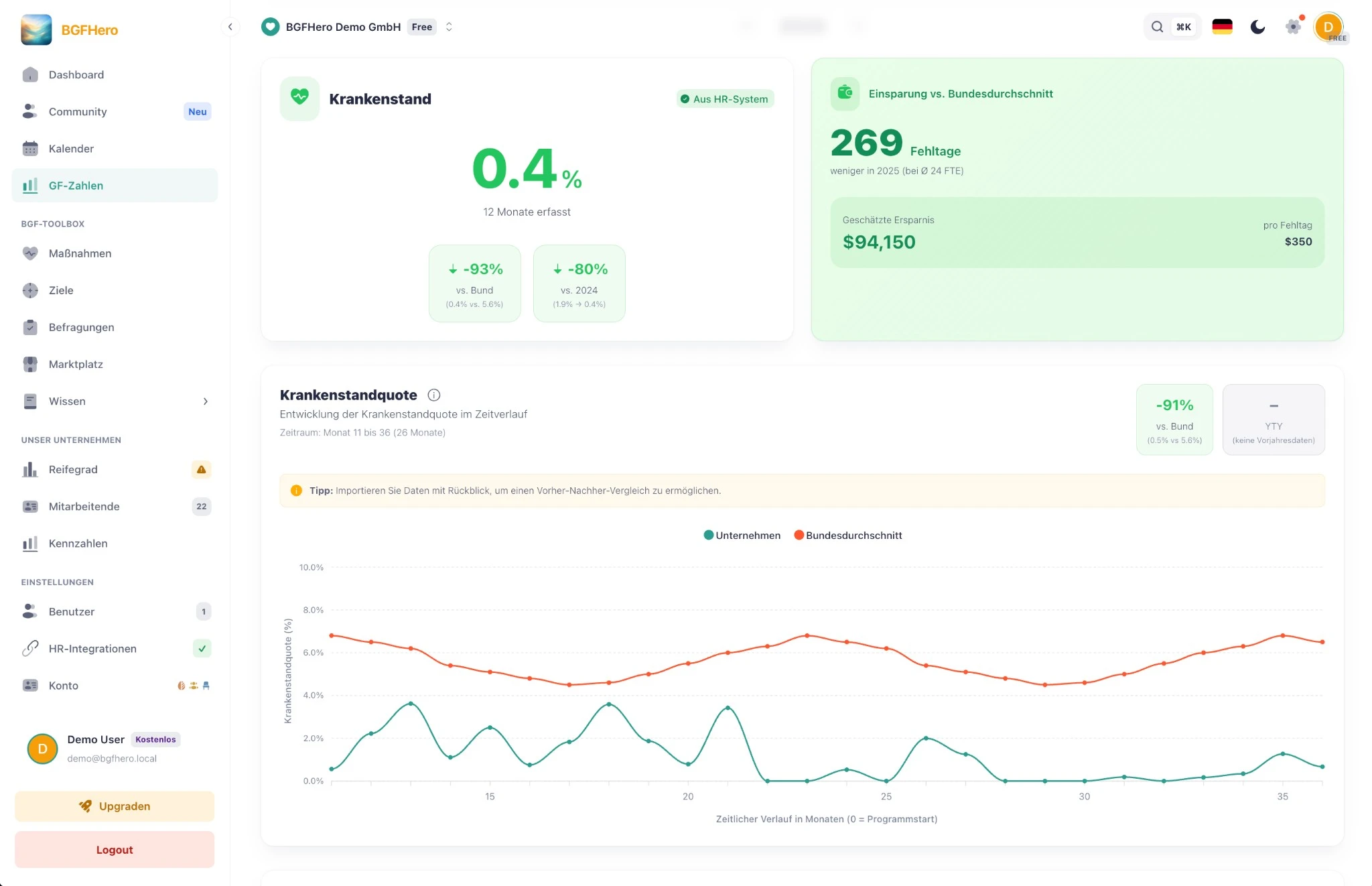
The three most important WHP metrics are **absenteeism**, the **turnover rate**, and the **Bradford Factor**. Absenteeism is calculated from the number of sick days in relation to the target working hours – expressed as a percentage. According to official statistics from the German Federal Ministry of Health (KM1), the German national average in 2025 was **5.66%**. If your value is consistently above this, it’s a clear signal that action is needed. If it’s consistently below, it would be naive to assume that everything is running optimally – it’s possible that no one is reporting sick who should be (presenteeism).
What does the Bradford Factor measure – and why does frequency matter more than duration?
The Bradford Factor makes visible what a simple absence rate conceals: Someone who is sick three times for a short period puts more strain on the company than someone who is absent once for two weeks. The formula is:
**B = S² × D**
Here, **S** stands for the number of absence episodes in the period under review (e.g., one year) and **D** for the total number of sick days. Example: Three episodes of illness with two days each result in B = 3² × 6 = **54**. A single illness lasting six days results in B = 1² × 6 = **6**. There are no universally valid threshold values; literature and practice use different levels. Our metric analysis assigns the value per person over the last twelve months to four fixed levels: **below 50** normal, **50–124** elevated, **125–399** high, **from 400** critical. These are guideline values – they say nothing about the cause and do not replace a conversation.
Important: The Bradford Factor is not a sanctioning tool, but an early warning signal. It helps to identify potential stress situations early – before they escalate. Values per person are based on sick notes and are therefore health data (Art. 9 GDPR). In Germany, a works council, where one exists, is involved in such an evaluation (§ 87 Para. 1 No. 6 of the German Works Constitution Act, BetrVG). That’s why the Bradford Factor is deactivated by default with us; it is only activated deliberately in the metrics data entry when the basis has been clarified.
How do you move from spreadsheets to automatic analysis?
The most common mistake in practice: absenteeism and the Bradford Factor are managed in Excel – with all the known problems. Manual entry errors, outdated export data from the HR system, no historical comparability. Anyone who wants to create monthly reports spends more time maintaining data than analyzing it.
Better: The raw data comes directly from the HR system – Personio, DATEV, or rexxHR – and is evaluated automatically. This creates trend curves over quarters, department comparisons, and early outlier alerts, without anyone having to enter a single number by hand. For management reporting, a few clicks are enough instead of half a working day. How you can analyze short- and long-term absences separately is explained in the guide Analyze Absences.
How to put it in place
- 1Connect your HR system: Connect Personio, Factorial, rexx, Lucca or Kombo via the interface; you'll need the API credentials of your HR system. Without an interface, upload a DATEV export as a CSV or Excel file.
- 2Analyse periods and groups: The metrics show each month, the last twelve months and full years, each compared with the previous year. From the Manager role, you can break down sick leave rate and turnover by department, location, cost centre, gender or age group; groups of fewer than five people stay hidden.
- 3Switch on the Bradford Factor only deliberately: It is off by default. It is switched on in the data entry via "Record extended data (Bradford factor)". Scores per person are health data (Art. 9 GDPR); in Germany, a works council, where one exists, has a say (Section 87(1) No. 6 of the German Works Constitution Act, BetrVG) – clarify this first. EasyBGM places the scores in fixed bands: below 50 normal, 50–124 elevated, 125–399 high, 400 and above critical. These are guide values, not a standard.
- 4Set a sick leave target: Under Goals, create a sick leave goal with a baseline, target value and deadline. The metrics automatically compare your rate with the German national average for the same months (official KM1 statistics of the German Federal Ministry of Health) and with the previous year.
- 5Share figures with executive leadership: Under Management figures, select the sections and send them by email – or share a link with a PIN.
What you need
- Effort
- under 30 min
- Cost
- Free
- Duration
- 4 weeks
- Setup
- 45 min
- ✓ No more manual data upkeep: HR data flows automatically into the WHP analysis.
- ✓ Early warning system: Clusters of short-term illnesses become visible before they turn into serious problems.
- ✓ Demonstrable impact: Trend curves across quarters and years make the success of WHP measures measurable.
- ✓ Less reporting effort: Monthly WHP reports are created with a few clicks instead of half a day of Excel work.
Adopt it for your company
One click — and the measure sits ready in your plan. Guided step by step, no lengthy setup.
ÜbernehmenZahlt ein auf
Handlungsfeld
Passende Best Practices
Nicht sicher, wo ihr anfangen sollt? Selbstcheck →